Have you ever hummed a melody into your phone and wondered what it might sound like as a finished song? That tiny musical idea may contain the hook, chorus, or emotional center of a track. Today, AI music tools can help turn that rough vocal sketch into a structured arrangement with chords, rhythm, instruments, and even vocals. This guide explains how the process works, how to record a hum that software can understand, what to expect from the result, and how to turn a spontaneous idea into a song you can keep developing.
If you want to try the workflow immediately, open SongUp AI’s Hum to Song tool. It is designed for creators who have a melody before they have lyrics, music theory, or a full production setup.

What does hum to song mean?
Hum to song means using a recorded melody as the starting point for a new composition. Instead of searching a database to identify an existing song, the software analyzes your pitch and timing, estimates the musical key and tempo, and builds an arrangement around the idea. The result is different from a hum-to-search feature. Hum to search tries to recognize a released track. Hum to song helps you create an original track from a melody you made yourself.
This distinction matters for songwriters. A search tool is useful when you know a tune but not its title. A hum-to-song generator is useful when you have a tune that does not yet belong to a complete production. It can be helpful for beginners, singers, producers, video creators, podcasters, and anyone who regularly gets melodies at inconvenient times.
Why humming is a powerful songwriting shortcut
Many songs begin as fragments: a chorus sung while walking, a rhythm tapped on a desk, or a few notes remembered after waking up. Traditional production asks you to preserve that idea while opening a DAW, selecting sounds, creating chords, setting a tempo, and recording enough material to judge the concept. Those steps are valuable, but they can also interrupt creativity.
An AI song generator reduces the distance between inspiration and feedback. You can capture the melody first, hear a rough musical world around it, and then decide whether the idea deserves a longer writing session. This is not a replacement for taste. It is a fast sketching partner that gives you something concrete to react to. Sometimes the first arrangement reveals a stronger chorus; sometimes it shows that the melody needs a different rhythm or key.
How AI turns a hum into a complete song
The process usually has several stages. First, a pitch-detection system identifies the notes in your recording and measures when each note begins and ends. Next, it estimates the key, tempo, bars, and likely chord movement. The melody is then converted into a musical guide that an arrangement can follow.
After that, the music engine creates a backing track. Your chosen style may influence drums, bass, harmony, texture, and the lead instrument. Finally, the original melody is aligned with the finished backing so that it remains recognizable. Some systems generate a song that is merely inspired by a prompt; a melody-focused workflow is more useful when you want the tune you hummed to remain present.
SongUp explains this as a practical sequence: listen to the recording, write a lead sheet, record a band in the detected key and tempo, then place the melody over the real backing. That approach helps because generative music models are often better at style and arrangement than at copying an exact melody on command.
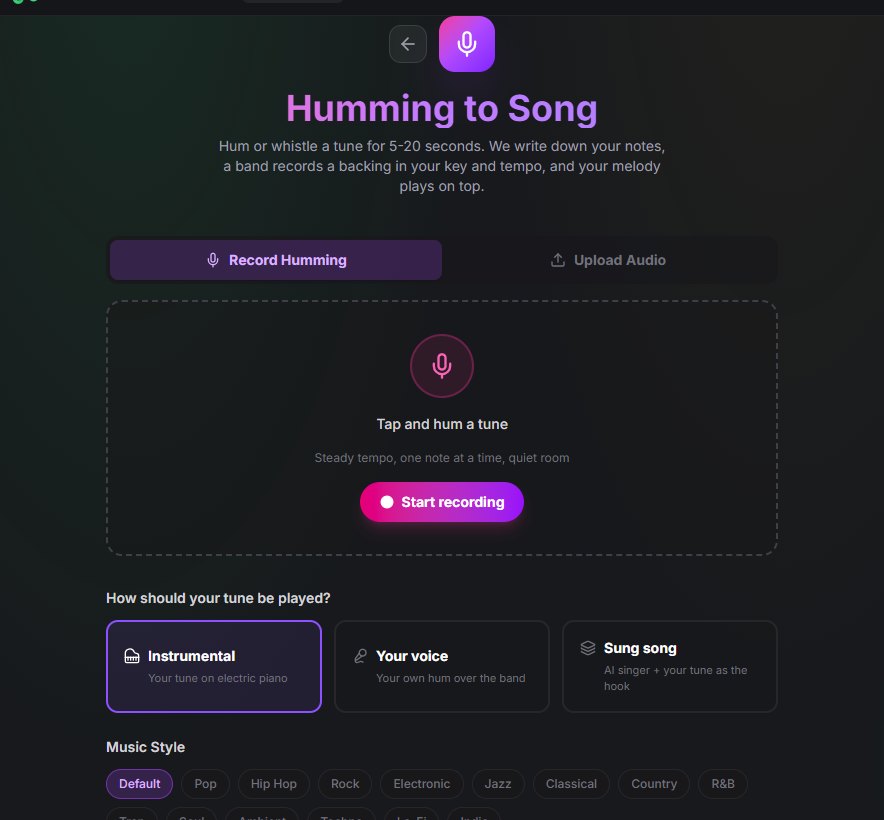
Step 1: Record a clear five-to-twenty-second melody
The quality of the input strongly affects the quality of the output. A useful recording does not need to be polished, but it should be understandable. Five to twenty seconds is a practical length because it is long enough to contain a phrase and short enough to keep your tempo steady. A chorus hook, a verse idea, or a simple “da da da” pattern can work.
Record one melody line at a time. Avoid humming over a guitar, keyboard, or another singer because extra pitches make note detection harder. If you prefer not to hum, whistle or sing a neutral syllable such as “la” or “doo.” Clear note starts are especially important. A closed-mouth hum can slide between pitches, while a syllable gives the algorithm a more obvious beginning for each note.
Use a quiet room and keep the phone roughly a hand’s width from your mouth. Turn off a fan if possible, pause background music, and avoid recording while people are talking nearby. You do not need a studio microphone; a clean phone voice memo is often enough. Keep the tempo consistent by tapping your foot or quietly nodding along.
Step 2: Check what the AI heard before generating
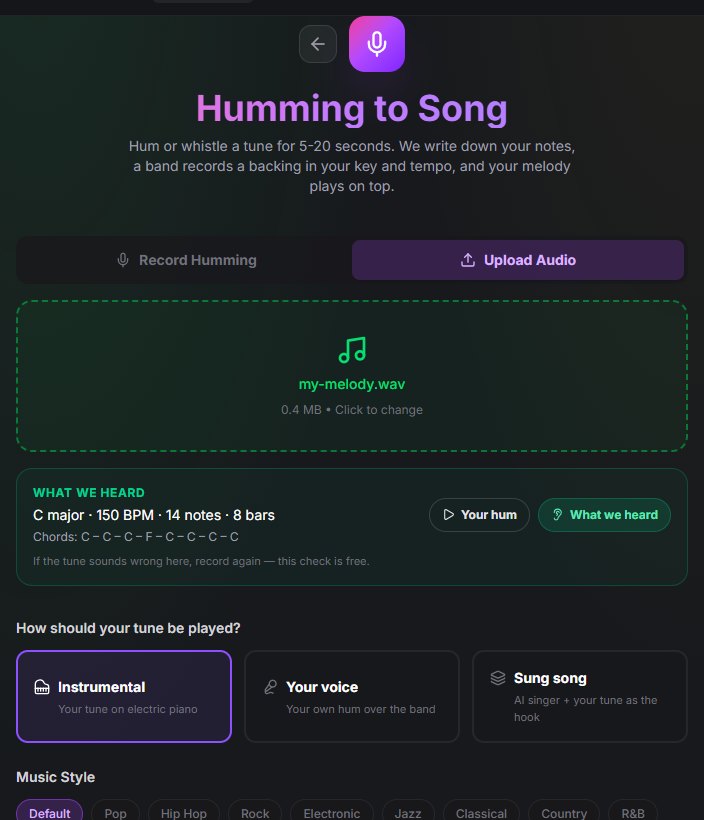
A good hum-to-song workflow gives you a preview of the interpretation before it spends generation credits. SongUp shows the detected key, tempo, note count, bar count, and chords, then lets you compare the cleaned-up playback with your original hum. This check is one of the most valuable parts of the process.
Listen for three things. First, does the playback follow the same contour as your idea? Second, is the tempo close to what you intended? Third, do the notes sound musical in the displayed key? If the result is wrong, recording again is usually faster than trying to rescue a bad interpretation later.
Common causes of errors include background noise, singing too quietly, sliding between notes, and changing speed halfway through the phrase. Move closer to the microphone, articulate each note, and try again. If the tool reports that it cannot hear a clear melody, make the phrase slightly louder and extend it to at least five seconds.
Step 3: Choose how your melody should appear
Most creators will want to compare three output modes. Instrumental mode places the melody on a lead sound over the band. It is a strong choice for hooks, beat ideas, background music, and testing a melody without committing to lyrics. Your voice mode keeps your own recording in the track, which can make the result feel personal and is useful when you already know how you want to sing.
Sung-song mode creates a fuller song with lyrics and an AI vocalist. You can provide your own words or use a lyric-writing feature for a starting draft. Keep one limitation in mind: an AI vocalist may write its own vocal line over the chords. If you need the exact hummed melody in every sung phrase, an instrumental lead or your own recorded voice is usually more reliable. A generated singer can still be excellent for discovering a song’s mood, structure, and lyrical direction.
Step 4: Pick a style that supports the melody
Style changes how a melody feels. A simple phrase that sounds intimate over piano may feel energetic over electronic drums. A wide, sustained vocal line may fit ambient or soul better than fast trap. SongUp offers options such as pop, hip hop, rock, electronic, jazz, classical, country, R&B, trap, soul, ambient, techno, lo-fi, and indie.
Start with the style that matches the emotion you heard in your head. Then make a second version in a contrasting style. This is a useful creative test because it separates the strength of the melody from the identity of the arrangement. If the tune works as both a lo-fi sketch and a rock hook, you may have a flexible songwriting idea.
Avoid over-directing the first attempt. Give the generator enough information to understand the mood, but leave room for arrangement decisions. After hearing the result, you can refine the lyrics, tempo, instrumentation, or structure with a more specific prompt.
Step 5: Let the band generate, then review the result
Creating the backing may take a few minutes. Once the band is ready, the melody is aligned to the actual tempo and key of that backing. It is normal for the finished track to differ slightly from the initial detected key because generative systems may choose a nearby practical range. The important question is whether the melody and harmony stay together and whether the hook remains recognizable.
Listen from the beginning, not only to the loudest section. Check the intro, transition into the main section, chorus, ending, and overall balance. Does the arrangement give the melody enough space? Are the drums masking the hook? Does the song feel too short or too repetitive? These observations tell you what to change in the next version.
How to improve a humming-to-song result
Improvement usually comes from better input and better iteration rather than from trying to control every detail at once. Record a second take with clearer syllables if the pitch is inaccurate. Try a shorter phrase if the timing wanders. If the arrangement feels crowded, select a simpler style or use an instrumental mode with a less busy lead. If the melody is too low or high for your voice, transpose your later vocal recording rather than forcing the first hum to be perfect.
It also helps to separate songwriting from production. First ask whether the melody is memorable. Then ask whether the harmony supports it. Only after those questions should you worry about mastering, effects, or release-ready loudness. An AI music maker can produce a polished draft quickly, but your creative judgment still determines what deserves another pass.
From AI sketch to finished release
An AI-generated draft can be the beginning of a larger workflow. Download the mix and record your own vocal over it. Use a recording studio to capture a cleaner performance. If you want to rearrange the track, a stem separator can split vocals, drums, bass, and other parts so you can edit them in a DAW. You can also convert a melody to MIDI for manual correction and deeper control.
For creators making music for videos, games, podcasts, or social posts, an early hum-to-song version can quickly reveal whether the mood is right. For songwriters, it can serve as a demo to share with collaborators. For producers, it can become a reference before rebuilding the most promising elements with recorded instruments. Keep the original hum, the first generated version, and later revisions together so you can compare how the idea evolved.
SongUp’s guide to making a song with AI is a useful next step for creators who want to move from a melody sketch into editing, arrangement, and release preparation. You can also explore its audio-to-MIDI tool if you prefer a hands-on DAW workflow.
Honest limitations to understand
No hum-to-song tool is magic. Most systems work best with one clear melody and may struggle when you record chords, harmonies, beatboxing, or two voices together. Pitch correction can tidy a slightly flat note, but it may also remove an intentional blue note or loose rubato feel. Timing may be snapped to a grid, so a deliberately free performance can sound more regular than the original.
Generative bands also make independent musical choices. The result may contain a chord, fill, or transition you did not imagine. That can be a strength when you want surprise, but it means you should review the arrangement rather than assuming every output is final. In sung mode, the vocalist may not follow your exact hum through every lyric line. Treat that mode as a songwriting and demo tool, and use your voice or an instrumental lead when melody fidelity is the priority.
Is turning humming into a song free?
Features vary by platform and plan. On SongUp, recording and checking what the system heard is available before full generation, so you can evaluate the notes and tempo first. Creating the complete backing uses plan credits, while paid plans may include commercial rights. Always review the current pricing, license, and download terms before using a generated track in a monetized project.
Copyright and responsible use
Your original melody is the creative starting point, but a finished AI-assisted track can involve several layers: your recording, generated arrangement, lyrics, vocal performance, and any samples or assets you add. Keep documentation of your process and read the platform’s current commercial-use terms. Do not upload someone else’s unreleased recording without permission, and do not ask an AI tool to imitate a living artist’s voice or copy a protected song.
Responsible use also means being transparent when a platform or client requires disclosure of AI assistance. Community-friendly music creation respects privacy, credits human collaborators, and avoids misleading listeners about who performed or wrote a part. These habits protect your work as it moves from an experiment to a public release.
Frequently asked questions
Can AI really turn humming into a song?
Yes. A melody model can detect pitch and timing, estimate musical information, and place the melody over an AI-generated arrangement. The clearer the input, the more recognizable the result is likely to be.
How long should the humming recording be?
Five to twenty seconds is a practical target. It is enough for a hook or phrase while reducing tempo drift and background noise.
Can I whistle or sing instead of humming?
Yes. Whistling and neutral syllables can make note starts clearer than a soft closed-mouth hum. Words are also possible, but the system generally focuses on the melody rather than the meaning of the lyrics.
Will the generated track stay in my key?
The system tries to build the backing around the detected key and tempo, then aligns the melody to the backing it actually generated. The final key may shift slightly, but the melody and harmony should remain compatible.
Can I use the finished song commercially?
That depends on the plan and the service terms. Check the current license before monetizing, distributing, or assigning the song to a client.
Final takeaway
The best reason to try hum to song is speed. A melody that would otherwise remain trapped in a voice memo can become a listenable demo in minutes. Record one clear line, check what the AI understood, choose a style, compare a few versions, and then decide what deserves human production. The tool works best when you use it as a creative collaborator: let it provide momentum and possibilities, while your ears decide which version is truly your song.
Ready to hear your idea? Visit SongUp AI’s Hum to Song generator, record a short hook, and explore what your voice memo can become.
Comments
Post a Comment